
How do I enable customer accounts in the Shopify admin?
Propel Subscriptions provides seamless integration with your store’s customer account page.
In order for it to work as intended, you have to ensure that it’s enabled on your store.
How to Enable Customer Account in your store?
Section titled “How to Enable Customer Account in your store?”1. In most cases, themes will add the customer account icon to your header. If you can already see this icon, or something similar, on your store then you’re good to go!
Section titled “1. In most cases, themes will add the customer account icon to your header. If you can already see this icon, or something similar, on your store then you’re good to go!”
If you don’t see this account icon or account text anywhere on your store, proceed to next steps.
2. Go to settings
Section titled “2. Go to settings”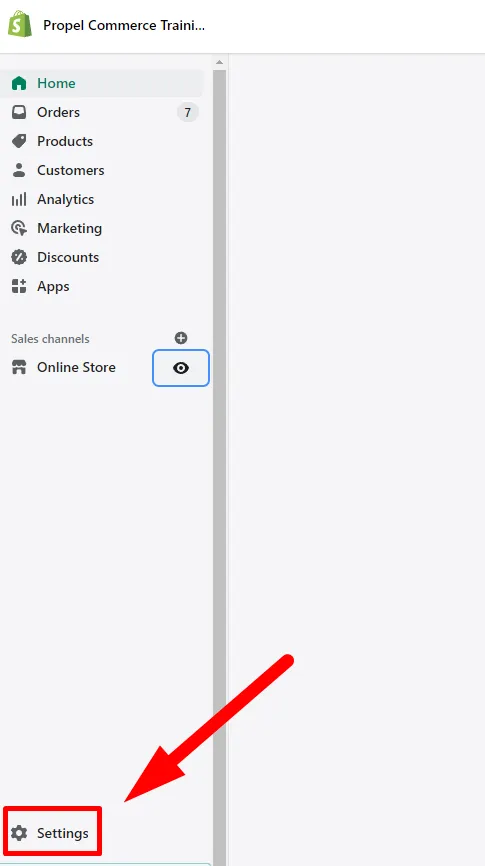
3. Navigate to Checkout tab and select either “Accounts are optional” or “Accounts are required”
Section titled “3. Navigate to Checkout tab and select either “Accounts are optional” or “Accounts are required””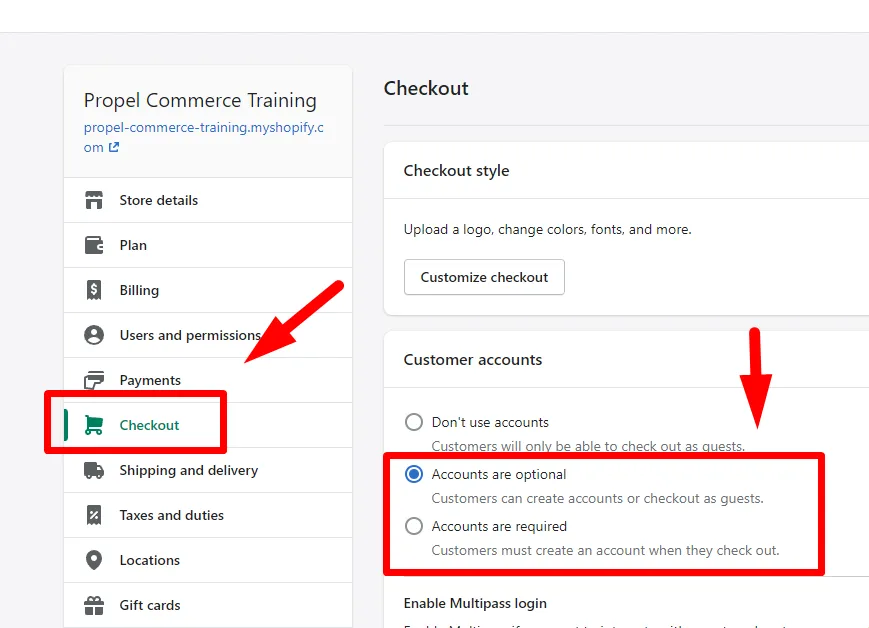
4. Save!
Section titled “4. Save!”Propel Subscription should do the rest of its magic for you.
If you’ve done this and you still can’t see the customer portal link, you can always chat with us or email support@propelcommerce.io